https://dev.to/ivadyhabimana/setup-eslint-prettier-and-husky-in-a-node-project-a-step-by-step-guide-946
https://dev.to/ivadyhabimana/setup-jest-and-react-testing-library-in-a-react-project-a-step-by-step-guide-1mf0
https://dev.to/ivadyhabimana/setup-eslint-prettier-and-husky-in-a-node-project-a-step-by-step-guide-946
https://dev.to/ivadyhabimana/setup-jest-and-react-testing-library-in-a-react-project-a-step-by-step-guide-1mf0

Ref: https://stackoverflow.com/questions/51131898/what-is-the-difference-between-type-and-class-in-typescript/51132333#51132333
Description | Type | Interface |
|---------------------------------------------------------|------|-----------|
| Describe functions                                      |   ✔  |     ✔     |
| Describe constructors                                   |   ✔  |     ✔     |
| Describe tuples                                         |   ✔  |     ✔     |
| Interfaces can extend                                   |   ≈  |     ✔     |
| Classes can extend                                      |   ✘  |     ✔     |
| Classes can implement                                   |   ≈  |     ✔     |
| Divide another one of its own kind                      |   ✔  |     ≈     |
| Create a union with another one of its own kind         |   ✔  |     ✘     |
| Be used to create mapped types                          |   ✔  |     ✘     |
| Be mapped over with mapped types                        |   ✔  |     ✔     |
| Expands in error messages and logs                      |   ✔  |     ✘     |
| Be completed                                            |   ✘  |     ✔     |
| Be recursive import { timer } from "rxjs";
@Component({
})
export class AppComponent implements OnInit{
progressBar: boolean = true; // Show spinner / progress bar initlly
constructor(){
const source = timer(2000); // 2 milli secs
const subscribe = source .subscribe( hide => this.hideProgress() } );
hideProgress(){
this.progressBar = false; // call the hide spinner
}
}
}
import { interval } from "rxjs";
import { Component, VERSION, OnInit } from '@angular/core';
import { Router, NavigationEnd } from '@angular/router';
import { filter } from 'rxjs/operators';@Component({
selector: 'my-app',
templateUrl: './app.component.html',
styleUrls: [ './app.component.css' ]
})
export class AppComponent implements OnInit {
previousUrl: string = null;
currentUrl: string = null; constructor(private router: Router) {}
ngOnInit() {
this.router.events.pipe(
filter((event) => event instanceof NavigationEnd)
).subscribe((event: NavigationEnd) => {
this.previousUrl = this.currentUrl;
this.currentUrl = event.url;
});
}
}Making it globally accessible
To make the previous url available outside of your
app.component.tsfile you can create a service with an observable that your components can subscribe to that holds your previous url value. Use the Angular CLI to create the serviceng g s shared/url. In theurl.service.tsfile, you should create both apreviousUrlbehavior subject and observable.import { Injectable } from '@angular/core';
import { BehaviorSubject, Observable } from 'rxjs';@Injectable()
export class UrlService {
private previousUrl: BehaviorSubject<string> = new BehaviorSubject<string>(null);
public previousUrl$: Observable<string> = this.previousUrl.asObservable();...Using a behavior subject gives you the ability to set the previous url directly. You can then set the value of the observable to the behavior subject. You will notice that I have kept the behavior subject private, this is so we can restrict access to the behavior subject. Next, in the
url.service.tsfile you can create a method to set the value of the previous url.setPreviousUrl(previousUrl: string) {
this.previousUrl.next(previousUrl);
}This sets the value of the behavior subject, which subsequently also sets the value of the observable. Now, any components that subscribe to the previous url observable will receive the updated value!
Subscribing to the previous URL observable
In any component you want to access the previous url, you need to import the url service, define it in its constructor, subscribe to the previous url observable, and set it as a variable in the component.
import { Component, OnInit } from '@angular/core';
import { Observable } from 'rxjs';
import { UrlService } from '../shared/url.service';@Component({
selector: 'app-dashboard',
templateUrl: './dashboard.component.html',
styleUrls: ['./dashboard.component.css']
})
export class DashboardComponent implements OnInit {
previousUrl: string = ''; constructor(private urlService: UrlService) { } ngOnInit(){
// Or subscribe to the previous url observable here
this.urlService.previousUrl$
.subscribe((previousUrl: string) => {
this.previousUrl = previousUrl
});
}}
Ref: https://jacobneterer.medium.com/accessing-the-previous-url-in-angular-32cf97bec3ce
How to translate your Angular app with ngx-translate:
-----------------------------------------------------------------
Overview steps - 1-6 levels
Add ngx-translate to your Angular application
Setup the TranslateService in your app.module.ts
Create your main language translation file (json)
Use translation markup (translate pipe) in your template files
Translate your json files to other languages
Switch languages at runtime
Extract translations form your source code
npm install -g @angular/cli
ng new translation-demo
cd translation-demo
ng serve
Step 1: Add ngx-translate your Angular application
npm install @ngx-translate/core @ngx-translate/http-loader
The @ngx-translate/core contains the core routines for the translation: The TranslateService, the translate pipe and more.
The @ngx-translate/http-loader loads the translation files dynamically from your webserver.
Step 2: Set up the TranslateModule and TranslateService
Now you have to init the translation TranslateModule in your app.module.ts. The required changes to that file are highlighted in blue:
import { NgModule } from '@angular/core';
import { BrowserModule } from '@angular/platform-browser';
import { AppComponent } from './app.component';
// import ngx-translate and the http loader
import {TranslateLoader, TranslateModule} from '@ngx-translate/core';
import {TranslateHttpLoader} from '@ngx-translate/http-loader';
import {HttpClient, HttpClientModule} from '@angular/common/http';
@NgModule({
declarations: [
AppComponent
],
imports: [
BrowserModule,
// ngx-translate and the loader module
HttpClientModule,
TranslateModule.forRoot({
loader: {
provide: TranslateLoader,
useFactory: HttpLoaderFactory,
deps: [HttpClient]
}
})
],
providers: [],
bootstrap: [AppComponent]
})
export class AppModule { }
// required for AOT compilation
export function HttpLoaderFactory(http: HttpClient): TranslateHttpLoader {
return new TranslateHttpLoader(http);
}
import { Component, VERSION } from '@angular/core';
import { TranslateService } from '@ngx-translate/core';
@Component({
selector: 'my-app',
templateUrl: './app.component.html',
styleUrls: ['./app.component.css'],
})
export class AppComponent {
name = 'Angular ' + VERSION.major;
constructor(private translate: TranslateService) {
translate.addLangs(['en', 'de']); // in the initial level not required,
translate.setDefaultLang('en');
translate.use('en');
}
useLanguage(language: string): void {
console.log(language);
this.translate.use(language);
}
}
Step 3: Create your JSON translation file
Each language is stored in a separate .json file. Let's create the JSON file for the English translation:
assets/i18n/en.json . Use the texts from the app.components.html .
ngx-translate can read 2 JSON formats:
assets/i18n/en.json
{
"demo": {
"title": "Translation demo",
"text": "This is a simple demonstration app for ngx-translate"
}
}
assets/i18n/de.json
{
"demo": {
"title": "Translation demo - from en json",
"text": "This is a simple demonstration app for ngx-translate - from en json",
"greeting": "Hello {{name}}!"
}
}
app.component.html:
<hello name="{{ name }}"></hello>
<p>Start editing to see some magic happen :)</p>
<button (click)="useLanguage('en')">en</button>
<button (click)="useLanguage('de')">de</button>
<div>
<h1>Translation demo</h1>
<p>This is a simple demonstration app for ngx-translate</p>
</div>
<h1>{{ 'demo.title' | translate }}</h1>
<!-- translation: translation pipe -->
<p>{{ 'demo.text' | translate }}</p>
<!-- translation: directive (key as attribute)-->
<p [translate]="'demo.text'"></p>
<!-- translation: directive (key as content of element) -->
<p translate>demo.text</p>
hello.component.ts:
import { Component, Input } from '@angular/core';
@Component({
selector: 'hello',
template: `<h1>Hello {{name}}!</h1>
<p>this pare is from child component</p>
<p translate>demo.text</p>`,
styles: [`h1 { font-family: Lato; }`],
})
export class HelloComponent {
@Input() name: string;
}
ref:
https://www.codeandweb.com/babeledit/tutorials/how-to-translate-your-angular-app-with-ngx-translate#add-ngx-translate-to-app
https://stackblitz.com/edit/angular-ivy-zywaay?file=src%2Fapp%2Fapp.component.html
External Validation, coding less
--------------------------------------
1.Security: OWASP , SQL injection, XSS, XSRF,
2.Performance Testing: light house Web page test- chrome extension to validate
UI Code / developer involvement
-------------------------- --------------
3.PWA: provide unexpected offline support for app to surve and store in local instead of broken
4.Accessibility :Aria-label=" text to hover explain" - button, link, video,
Screen reader - extension/ plugin
5.Early loading-PRPL - semi page load (on scroll down make another) or html,css load then load the app data values
<link rel="preload" as="style" href="css/style.css"> Lazy load
Create a new angular application using the following command
ng new ngx-charts-demo
Install ngx-charts package in an angular application using the following command.
npm install @swimlane/ngx-charts --save
At the time of installation if you get the following error
ERROR in The target entry-point "@swimlane/ngx-charts" has missing dependencies:
- @angular/cdk/portal
we need to add @angular/cdk using the following
npm install @angular/cdk --save
Import NgxChartsModule from 'ngx-charts' in AppModule. -- only in App module, not in the feature module
ngx-charts also required the BrowserAnimationsModule. Import it in AppModule.
import { BrowserModule } from '@angular/platform-browser';
import { NgModule } from '@angular/core';
import { AppComponent } from './app.component';
import { NgxChartsModule }from '@swimlane/ngx-charts';
import { BrowserAnimationsModule } from '@angular/platform-browser/animations';
@NgModule({
declarations: [
AppComponent
],
imports: [
BrowserModule,
BrowserAnimationsModule,
NgxChartsModule
],
providers: [],
bootstrap: [AppComponent]
})
export class AppModule { }
import { Component } from '@angular/core';
@Component({
selector: 'app-root',
templateUrl: './app.component.html',
styleUrls: ['./app.component.css']
})
export class AppComponent {
saleData = [
{ name: "Mobiles", value: 105000 },
{ name: "Laptop", value: 55000 },
{ name: "AC", value: 15000 },
{ name: "Headset", value: 150000 },
{ name: "Fridge", value: 20000 }
];
}
<ngx-charts-pie-chart
[results]="saleData"
[legend]="true"
[legendTitle]="'Product Sale Report'"
[view]="[1000,300]"
[labels]="true" >
</ngx-charts-pie-chart>
<!--<ngx-charts-bar-vertical
[view]="[1000,400]"
[results]="saleData"
[xAxisLabel]="'Products'"
[legendTitle]="'Product Sale Chart'"
[yAxisLabel]="'Sale'"
[legend]="true"
[showXAxisLabel]="true"
[showYAxisLabel]="true"
[xAxis]="true"
[yAxis]="true"
[gradient]="true">
</ngx-charts-bar-vertical>-->
<!--<ngx-charts-pie-chart
[results]="saleData"
[legend]="true"
[legendTitle]="'Product Sale Report'"
[view]="[1000,300]"
[labels]="true" >
</ngx-charts-pie-chart>-->
<ngx-charts-advanced-pie-chart
[view]="[1000,400]"
[results]="saleData"
[gradient]="true" >
</ngx-charts-advanced-pie-chart>

npm install highcharts --save
npm install highcharts-angular --save
add high chart as component and def at declarations
import { HighchartsChartModule } from 'highcharts-angular';
@NgModule({
declarations: [
AppComponent,
],
imports: [
BrowserModule,
commonModule,
HighchartsChartModule
],
providers: [],
bootstrap: [AppComponent]
})
export class AppModule { }
<highcharts-chart
[Highcharts] = "highcharts"
[options] = "chartOptions"
style = "width: 100%; height: 400px; display: block;">
</highcharts-chart>
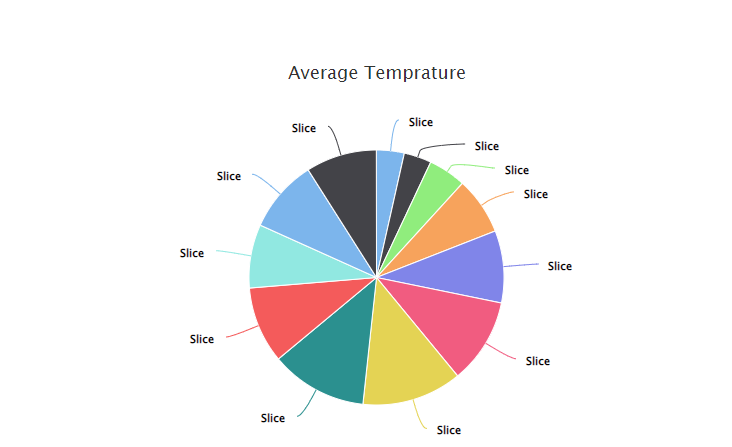
import * as Highcharts from 'highcharts';
@Component({
selector: 'app-highchart',
templateUrl: './highchart.component.html',
styleUrls: ['./highchart.component.less']
})
export class HighchartComponent implements OnInit {
constructor() { }
ngOnInit(): void {
}
highcharts = Highcharts;
chartOptions: Highcharts.Options = {
title: {
text: 'Average Temprature',
},
xAxis: {
title: {
text: 'Tokyo',
},
categories: [
'Jan',
'Feb',
'Mar',
'Apr',
'May',
'Jun',
'Jul',
'Aug',
'Sep',
'Oct',
'Nov',
'Dec',
],
},
yAxis: {
title: {
text: 'Temprature',
},
},
series: [
{
data: [
7.0, 6.9, 9.5, 14.5, 18.2, 21.5, 25.2, 24.4, 19.3, 16.0, 18.4, 17.9,
],
type: 'spline', // type:'bar', type:'pie' , type: 'spline',
},
],
};
}
npm install d3 --save
npm install @types/d3 --save-dev
import * as d3 from 'd3';
<div #svgContainer (window:resize)="onResize()"></div>
import { AfterViewInit, Component, ElementRef, HostListener, Input, OnChanges, SimpleChanges, ViewChild} from '@angular/core';
import * as d3 from 'd3';
import {ScaleBand} from 'd3';
@Component({
selector: 'app-d3chart',
templateUrl: './d3chart.component.html',
styleUrls: ['./d3chart.component.less']
})
export class D3chartComponent implements AfterViewInit, OnChanges {
@Input() data;//!: { name: string, series: { name: string, value: number }[] }[];
@Input() height = 300;
@Input() margin = {top: 10, left: 50, right: 10, bottom: 20};
@Input() innerPadding = 0.1;
@Input() outerPadding = 0.1;
@Input() seriesInnerPadding = 0.1;
domain = [0, 1000];
@Input() barColors = ['#00aeef', '#f98e2b', '#7C77AD'];
// @Input() domain = [0, 1000];
// @Input() barColors = ['#00aeef', '#f98e2b', '#7C77AD'];
// @Input() data!: { name: string, series: { name: string, value: number }[] }[];
public svg!: d3.Selection<SVGGElement, unknown, null, undefined>;
public isRendered = false;
@ViewChild('svgContainer', {read: ElementRef, static: true}) svgContainerRef!: ElementRef<HTMLDivElement>;
constructor() {
this.barColors = ['#a9ce97', '#a5b5de'];
this.domain = [100, 1000];
this.data = [
{
name: 'Row1',
series: [
{name: 'Bar1', value: 150},
{name: 'Bar2', value: 200}
],
},
{
name: 'Row2',
series: [
{name: 'Bar1', value: 300},
{name: 'Bar2', value: 400}
],
},
{
name: 'Row3',
series: [
{name: 'Bar1', value: 500},
{name: 'Bar2', value: 1000}
],
}
];
}
@HostListener('window:resize')
onResize() {
this.createChart();
}
ngOnChanges(changes: SimpleChanges) {
if (this.isRendered) {
this.createChart();
}
}
ngAfterViewInit(): void {
this.createChart();
this.isRendered = true;
}
private createSVG(): void {
this.svg = d3.select(this.svgContainerRef.nativeElement)
.append('svg')
.attr('width', '100%')
.attr('height', this.height)
.append('g')
.attr('width', '100%')
.attr('transform', 'translate(0, 0)')
.attr('class', 'bar-chart-vertical'); /// chart type
}
private isDataValid(): boolean {
return this.data && this.data.length > 0;
}
private getBandScale(domain: string[], range: any, innerPadding = 0, outerPadding = 0) {
const scale: any | ScaleBand<string> = d3.scaleBand()
.range(range)
.domain(domain)
.paddingInner(innerPadding)
.paddingOuter(outerPadding);
scale.type = 'BAND';
return scale;
}
private createChart(): void {
if (!this.isRendered) {
this.createSVG();
}
if (this.isDataValid()) {
const margin = {
top: this.margin.top,
right: this.margin.right,
bottom: this.margin.bottom,
left: this.margin.left,
}
let height = this.height - margin.top - margin.bottom;
const width = this.svgContainerRef.nativeElement.getBoundingClientRect().width - margin.left - margin.right;
const groupNames = this.data.map(item => item.name);
const groupLabels = this.data.length > 0 ? this.data[0].series.map(item => item.name) : [];
const xScale = this.getBandScale(groupNames, [0, width], this.innerPadding, this.outerPadding).round(true);
const x1Scale = this.getBandScale(groupLabels, [0, xScale.bandwidth()], this.seriesInnerPadding, this.outerPadding).round(true);
let chartContainer = this.svg.selectAll<SVGGElement, number>('g.chart-container').data([1]);
chartContainer = chartContainer.enter()
.append('g')
.attr('class', 'chart-container')
.merge(chartContainer)
.attr('transform', `translate(${margin.left}, ${margin.right})`);
let chartWrap = chartContainer.selectAll<SVGGElement, number>('g.chart-wrap').data([1]);
chartWrap = chartWrap.enter()
.append('g')
.attr('class', 'chart-wrap')
.merge(chartWrap)
.attr('transform', 'translate(0, 0)');
const xAxis = chartWrap.selectAll<SVGGElement, number>('g.x-axis').data([1]);
xAxis.enter()
.append('g')
.attr('class', 'x-axis')
.merge(xAxis)
.attr('transform', `translate(0, ${height})`)
.call(d3.axisBottom(xScale)).selectAll('text')
.style('text-anchor', 'middle');
const y = d3.scaleLinear().domain(this.domain).nice().rangeRound([height, 0]);
let barWrap = chartWrap.selectAll<SVGGElement, number>('g.bar-wrap').data([1]);
barWrap.exit().remove();
barWrap = barWrap.enter().append('g')
.attr('class', 'bar-wrap')
.merge(barWrap);
let barGroup = barWrap.selectAll<SVGGElement, {name: string, series: {name: string, value: number}}>('g.bar-group').data(this.data);
barGroup.exit().remove();
barGroup = barGroup.enter().append('g')
.attr('class', 'bar-group')
.merge(barGroup)
.attr('transform', d => `translate(${xScale(d.name)}, 0)`);
let barRects = barGroup.selectAll<SVGRectElement, {name: string, value: number}>('rect.bar').data(d => d.series.map(item => item));
barRects.enter()
.append('rect')
.merge(barRects)
.attr('class', 'bar')
.attr('width', x1Scale.bandwidth())
.attr('height', d => height - y(d.value))
.attr('x', (d: any) => x1Scale(d.name))
.attr('y', d => y(d.value))
.attr('fill', (d, i) => this.barColors[i]);
let yAxis = chartWrap.selectAll<SVGGElement, number>('g.y-axis').data([1]);
yAxis.enter()
.append('g')
.attr('class', 'y-axis')
.merge(yAxis)
.call(d3.axisLeft(y));
}
}
}

<!DOCTYPE html>
<html lang="en">
<head>
<metadata tag="UTF-8">
<script>
window.onload = function()
{
let test = document.getElementById("body");
test.addEventListener("mouseout", function(event) {
// highlight the mouseenter target
console.log('mouse out');
})
}
</script>
</head>
<body id="body">
Online Test mouse out to count for mouse out from screen to prevent user interaction with google
</body>
</html>
React:
Soln:1
=======api.jsimport axios from "axios";const api = axios.create({
baseURL: process.env.REACT_APP_BASE_URL || "http://localhost:3000",
});
export default api;
import api from "../services/api";
const response = await api.post("/sessions", { email, password });
Soln:2=======import Axios from "axios";
Axios.defaults.baseURL = "http://127.0.0.1:8000/api/";
in any other components use
insted of http://127.0.0.1:8000/api/user use only user
axios.get('user') // just 'user' append the data
.then((res)=> {
console.log(res)
})
Angular:
-----
environment.ts
export const environment = {
production: false,
baseUrl: 'http://fakerestapi.azurewebsites.net/api'
};
environment.prod.ts file
export const environment = {
production: true,
baseUrl: 'https://jsonplaceholder.typicode.com'
}
refer baseUrl from environment.ts file
import { environment } from '../environments/environment';
@Injectable()
export class DataService {
baseUrl = environment.baseUrl;
constructor(private httpClient: HttpClient) { }
getUser(id: number) {
let url = this.baseUrl + '/users/1';
return this.httpClient.get<JSON>(url);
}
}

