Wednesday, 18 February 2026

mysql to mariadb: unknown collation utf8mb4_0900_ai_ci

 57

I have a mysql 8.0 that I exported using mysqldump. I am trying to import it onto a Mariadb 10.4 database with phpmyadmin, both are the most current versions. Each time I do it though, I get:

Error: Unknown collation utf8mb4_0900_ai_ci

Then I went back into the sql file and replaced utf8mb4_0900_ai_ci with utf8mb4_general_ci, but then it says there are errors with various CREATE VIEW sql statements. Are there any other quick, error free fixes I can try?

Saturday, 3 January 2026

Micro front end module federation - UI Arch


Wednesday, 8 October 2025

OWASP - Top 10 Policies


Top 10 Web Application Security Risks


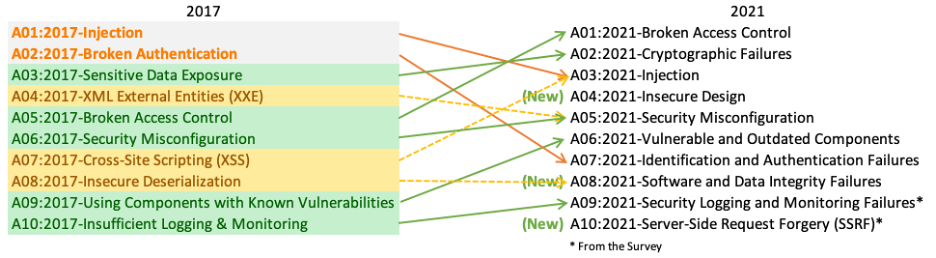
There are three new categories, four categories with naming and scoping changes, and some consolidation in the Top 10 for 2021.

Mapping

  • A01:2021-Broken Access Control moves up from the fifth position; 94% of applications were tested for some form of broken access control. The 34 Common Weakness Enumerations (CWEs) mapped to Broken Access Control had more occurrences in applications than any other category.
  • A02:2021-Cryptographic Failures shifts up one position to #2, previously known as Sensitive Data Exposure, which was broad symptom rather than a root cause. The renewed focus here is on failures related to cryptography which often leads to sensitive data exposure or system compromise.
  • A03:2021-Injection slides down to the third position. 94% of the applications were tested for some form of injection, and the 33 CWEs mapped into this category have the second most occurrences in applications. Cross-site Scripting is now part of this category in this edition.
  • A04:2021-Insecure Design is a new category for 2021, with a focus on risks related to design flaws. If we genuinely want to “move left” as an industry, it calls for more use of threat modeling, secure design patterns and principles, and reference architectures.
  • A05:2021-Security Misconfiguration moves up from #6 in the previous edition; 90% of applications were tested for some form of misconfiguration. With more shifts into highly configurable software, it’s not surprising to see this category move up. The former category for XML External Entities (XXE) is now part of this category.
  • A06:2021-Vulnerable and Outdated Components was previously titled Using Components with Known Vulnerabilities and is #2 in the Top 10 community survey, but also had enough data to make the Top 10 via data analysis. This category moves up from #9 in 2017 and is a known issue that we struggle to test and assess risk. It is the only category not to have any Common Vulnerability and Exposures (CVEs) mapped to the included CWEs, so a default exploit and impact weights of 5.0 are factored into their scores.
  • A07:2021-Identification and Authentication Failures was previously Broken Authentication and is sliding down from the second position, and now includes CWEs that are more related to identification failures. This category is still an integral part of the Top 10, but the increased availability of standardized frameworks seems to be helping.
  • A08:2021-Software and Data Integrity Failures is a new category for 2021, focusing on making assumptions related to software updates, critical data, and CI/CD pipelines without verifying integrity. One of the highest weighted impacts from Common Vulnerability and Exposures/Common Vulnerability Scoring System (CVE/CVSS) data mapped to the 10 CWEs in this category. Insecure Deserialization from 2017 is now a part of this larger category.
  • A09:2021-Security Logging and Monitoring Failures was previously Insufficient Logging & Monitoring and is added from the industry survey (#3), moving up from #10 previously. This category is expanded to include more types of failures, is challenging to test for, and isn’t well represented in the CVE/CVSS data. However, failures in this category can directly impact visibility, incident alerting, and forensics.
  • A10:2021-Server-Side Request Forgery is added from the Top 10 community survey (#1). The data shows a relatively low incidence rate with above average testing coverage, along with above-average ratings for Exploit and Impact potential. This category represents the scenario where the security community members are telling us this is important, even though it’s not illustrated in the data at this time.
REf Link - https://owasp.org/www-project-top-ten/

Saturday, 26 April 2025

single spa root config -index ejs laod the latest build , dynamic app urls

single spa root config -index ejs 

------------------------------------

dynamic load balancer and load the latest build to ui app

<!DOCTYPE html>

<html lang="en">

  <head>

    <meta charset="UTF-8" />

    <meta name="viewport" content="width=device-width, initial-scale=1.0" />

    <meta http-equiv="X-UA-Compatible" content="ie=edge" />

    <title>Single SPA root config</title>


    <script src="https://cdn.jsdelivr.net/npm/regenerator-runtime@0.13.7/runtime.min.js"></script>

    <link

      rel="preload"

      href="https://cdn.jsdelivr.net/npm/single-spa@5.9.0/lib/system/single-spa.min.js"

      as="script"

    />

    <!--

    This CSP allows any SSL-enabled host and for arbitrary eval(), but you should limit these directives further to increase your app's security.

    Learn more about CSP policies at https://content-security-policy.com/#directive

  -->

    <!--   <meta http-equiv="Content-Security-Policy" content="default-src 'self' https: localhost:*; script-src 'unsafe-inline' 'unsafe-eval' https: localhost:*; connect-src https: localhost:* ws://localhost:*; style-src 'unsafe-inline' https:; object-src 'none';"> -->

    <meta name="importmap-type" content="systemjs-importmap" />


    <!-- Add your organization's prod import map URL to this script's src  -->


    <script src="https://cdn.jsdelivr.net/npm/zone.js@0.11.3/dist/zone.min.js"></script>


    <script src="https://cdn.jsdelivr.net/npm/import-map-overrides@2.2.0/dist/import-map-overrides.js"></script>

    <% if (isLocal) { %>

    <script src="https://cdn.jsdelivr.net/npm/systemjs@6.8.3/dist/system.js"></script>

    <script src="https://cdn.jsdelivr.net/npm/systemjs@6.8.3/dist/extras/amd.js"></script>

    <% } else { %>

    <script src="https://cdn.jsdelivr.net/npm/systemjs@6.8.3/dist/system.min.js"></script>

    <script src="https://cdn.jsdelivr.net/npm/systemjs@6.8.3/dist/extras/amd.min.js"></script>

    <% } %>

  </head>

  <body>

    <noscript> You need to enable JavaScript to run this app. </noscript>

    <div id="nav-container"></div>

    <main>

      <div id="mfe1-container"></div>

      <div id="mfe2-container"></div>

    </main>

    <div id="root"></div>

    <script async>

          async function isFirstPoolUp(url) {

            try {

              const response = await fetch(url, { method: 'HEAD' });

                console.log('The URL is valid and accessible.');

                return true;

            } catch (error) {

              console.error('Error fetching the URL:', error);

              return false;

            }

          }

      let poolOne = '';

      (async () => {

      let url = '';

      let env = 'dev';

      if(window.location.hostname.includes('prod')) {

        url = "https://mfe1-godaddy-prod.com/main.js";

        env = 'prod';

      } else if(window.location.hostname.includes('test')) {

        url = "https://mfe1-godaddy-test.com/main.js";

        env = 'test';

      } else {

        url = "https://mfe1-godaddy-dev.com/main.js";

      }

      poolOne = await isFirstPoolUp(url);

      console.log(poolOne);


          // Create a dynamic import map based on window.location

          const importMap = {

            imports: {

              "single-spa": "https://cdn.jsdelivr.net/npm/single-spa@5.9.0/lib/system/single-spa.min.js",

              "@mfeappsinglespa/root-config": "/main.js",

              "react": "https://cdn.jsdelivr.net/npm/react@17/umd/react.production.min.js",

              "react-dom": "https://cdn.jsdelivr.net/npm/react-dom@17/umd/react-dom.production.min.js",

              "@mfeappsinglespa/mfe1": env == 'prod' ? "https://mfe1-godaddy-prod.com/main.js?"+Date.now() : env == 'test' ? "https://mfe1-godaddy-test.com/main.js?"+Date.now() : "https://mfe1-godaddy-dev.com/main.js/main.js?"+Date.now(),

              "@mfeappsinglespa/mfe2": env == 'prod' ? "https://mfe2-godaddy-prod.com/main.js?"+Date.now() : env == 'test' ? "https://mfe1-godaddy-test.com/main.js?"+Date.now() : "https://mfe1-godaddy-dev.com/main.js/main.js?"+Date.now(),

            }

          };

          const importMap2 = {

              imports: {

                "single-spa": "https://cdn.jsdelivr.net/npm/single-spa@5.9.0/lib/system/single-spa.min.js",

                "@mfeappsinglespa/root-config": "/main.js",

                "react": "https://cdn.jsdelivr.net/npm/react@17/umd/react.production.min.js",

                "react-dom": "https://cdn.jsdelivr.net/npm/react-dom@17/umd/react-dom.production.min.js",

                "@mfeappsinglespa/mfe1": env == 'prod' ? "https://mfe1-godaddy-prod2.com/main.js?"+Date.now() : env == 'test' ? "https://mfe1-godaddy-test2.com/main.js?"+Date.now() : "https://mfe1-godaddy-dev2.com/main.js/main.js?"+Date.now(),

                "@mfeappsinglespa/mfe2": env == 'prod' ? "https://mfe2-godaddy-prod2.com/main.js?"+Date.now() : env == 'test' ? "https://mfe1-godaddy-test2.com/main.js?"+Date.now() : "https://mfe1-godaddy-dev2.com/main.js/main.js?"+Date.now(),

            }

            };


          // Inject the import map into the document

          const script = document.createElement('script');

          script.type = 'systemjs-importmap';

          script.textContent = JSON.stringify(poolOne ? importMap : importMap2);

          document.head.appendChild(script);


          // Import the main module

          System.import('@mfeappsinglespa/root-config').catch(console.error);

           })();

    </script>

    <import-map-overrides-full

      show-when-local-storage="devtools"

      dev-libs

    ></import-map-overrides-full>

  </body>

</html>


React-Setting Prettier on a React Typescript project:

 Setting Prettier on a React Typescript project:

===============================================

Step 1: Create a React Project with Typescript

npx create-react-app my-app --template typescript


Step 2: Install Prettier package

npm install --save-dev --save-exact prettier


Step 3: ‘prettierrc.json’ file

Create a ‘.prettierrc.json’ file and add some prettier rules:


Example:


{

"trailingComma": "es5",

"tabWidth": 4,

"semi": false,

"singleQuote": true

}


Step 4: ‘.prettierignore’ file

Create a ‘.prettierignore ‘ file and add the follow:


node_modules

# Ignore artifacts:

build

coverage

Step 5: Running Prettier

Inside the project directory, open a terminal.


To run Prettier and format the code, just run:


npx prettier --write <targetFile>


Step 5.1: Let’s Run!

On the project that we create, let’s run prettier over the file App.tsx.


npx prettier --write src/App.tsx


npx prettier --write .  ( For all files )

Saturday, 8 February 2025

Data scientist in 2025 - guide YT


Reference from YouTube Channel: Sahil & Sarra

► Everything in one place: Datacamp Associate Data Scientist with Python Career Track:
https://datacamp.pxf.io/ds-track

Data Scientist Certification: https://datacamp.pxf.io/ds-cert

► In this video we covered: 1. How to actually learn Data Science? 2. What skills do you need to develop? 3. What are the best Data Science courses and Certifications? ► Links to everything discussed in the video: 1. Khan academy Linear Algebra: https://www.khanacademy.org/math/line...

2. Khan academy Calculus: https://www.khanacademy.org/math/calc...

3. Khan academy Statistics and Probability: https://www.khanacademy.org/math/stat...

4. Python: https://www.learnpython.org/

5. SQL: https://www.w3schools.com/sql/

6. Machine Learning Specialization: https://imp.i384100.net/machine-learn...

7. Kaggle: https://www.kaggle.com/


Tuesday, 16 April 2024

React + Typescript_ Module federation _ Micro Front end -Standalone and integrated


Module Federation

The Module Federation is actually part of Webpack config. This config enables us to expose or receive different parts of the CRA to another CRA project. These separate project should not have dependencies between each other, so they can be developed and deployed individually.


Let’s first start by creating our Container project which exports other two app APP-1 and APP-2.


step:1

npx create-react-app container --template typescript


step:2

Container App

npm install html-webpack-plugin serve ts-loader webpack webpack-cli webpack-dev-server @chakra-ui/react @emotion/react@^11 @emotion/styled@^11 framer-motion@^5


step:3

index.tsx -> bootstrap.tsx

move content

step:4

index.tsx ->index.ts


import("./bootstrap");

export {};


step:5

App.tsx:


import { Box, Center, Flex, Heading, Spinner, Image, Link, Text } from '@chakra-ui/react';

import React from 'react';


const CounterAppOne = React.lazy(() => import('app1/MFE1WebpackAppName1'));    //// impoert('appName/exposeCompoent');

const CounterAppTwo = React.lazy(() => import('app2/MFE2WebpackAppName2'));


export const App=()=>{


return(

<>

<React.Suspense fallback={<>loading... </>}>

<CounterAppOne />

</React.Suspense >

<React.Suspense fallback={<>loading... </>}>

<CounterAppTwo />

</React.Suspense >

</>

)


step:6


webpack.config.js


const HtmlWebpackPlugin = require("html-webpack-plugin");

const webpack = require("webpack"); // only add this if you don't have yet

const { ModuleFederationPlugin } = webpack.container;

const deps = require("./package.json").dependencies;


const buildDate = new Date().toLocaleString();


module.exports = (env, argv) => {

  const isProduction = argv.mode === "production";

  console.log({ isProduction });

  return {

    entry: "./src/index.ts",

    mode: process.env.NODE_ENV || "development",

    devServer: {

      port: 3000,

      open: true,

    },

    resolve: {

      extensions: [".ts", ".tsx", ".js"],

    },

    module: {

      rules: [

        {

          test: /\.(js|jsx|tsx|ts)$/,

          loader: "ts-loader",

          exclude: /node_modules/,

        },

      ],

    },


    plugins: [

      new webpack.EnvironmentPlugin({ BUILD_DATE: buildDate }),

      new webpack.DefinePlugin({

        "process.env": JSON.stringify(process.env),

      }),

      new ModuleFederationPlugin({

        name: "container",

        remotes: {

          app1: "app1@http://localhost:3001/remoteEntry.js",

          app2: "app2@http://localhost:3002/remoteEntry.js",

        },

        shared: {

          ...deps,

          react: { singleton: true, eager: true, requiredVersion: deps.react },

          "react-dom": {

            singleton: true,

            eager: true,

            requiredVersion: deps["react-dom"],

          },

        },

      }),

      new HtmlWebpackPlugin({

        template: "./public/index.html",

      }),

    ],

  };

};


step:7


Update your package.json scripts as follows:


"scripts": {

    "start": "webpack serve --open",

    "build": "webpack --config webpack.prod.js",

    "serve": "serve dist -p 3000",

    "clean": "rm -rf dist"

}


step:8


Update your tsconfig as follows:

tsconfig.ts


{

  "compilerOptions": {

    "target": "es5",

    "lib": ["dom", "dom.iterable", "esnext"],

    "baseUrl": "./",

    "allowJs": true,

    "skipLibCheck": true,

    "esModuleInterop": true,

    "allowSyntheticDefaultImports": true,

    "strict": true,

    "forceConsistentCasingInFileNames": true,

    "noFallthroughCasesInSwitch": true,

    "module": "esnext",

    "moduleResolution": "node",

    "resolveJsonModule": true,

    "isolatedModules": true,

    "noEmit": false,

    "jsx": "react-jsx"

  },

  "include": ["src"]

}


step:9


Create a .env in the project root folder:


DEV_APP1="MFE1WebpackAppName1@http://localhost:3001/remoteEntry.js"

DEV_APP2="app2@http://localhost:3002/remoteEntry.js"


PROD_APP1="MFE1WebpackAppName1@http://YOUR_APPLICATION_PRODUCTION_URL_HERE/remoteEntry.js"

PROD_APP2="app2@http://YOUR_APPLICATION_PRODUCTION_URL_HERE/remoteEntry.js"


npm start ( need to run all mfe's  in standalone mode)


npm run build

then dist will create with mentioned remoteEntry.js files


npm run serve will provide the


MFE-1 ( app1)


step:1


npx create-react-app app-1 --template typescript

yarn add html-webpack-plugin serve ts-loader webpack webpack-cli webpack-dev-server @chakra-ui/react @emotion/react@^11 @emotion/styled@^11 framer-motion@^5


Just like we did in Container app we’ll setup bootstrap.tsx, index.ts and app.tsx.


bootstrap.tsx

import App from './App';

import React from 'react';

import ReactDOM from 'react-dom/client';

import { ChakraProvider } from "@chakra-ui/react";


const root = ReactDOM.createRoot(document.getElementById('root') as HTMLElement)

root.render(

  <ChakraProvider>

    <App />

  </ChakraProvider>

);

Copy

And add those into index.ts


index.ts

import("./bootstrap");


App.tsx

import CounterAppOne from './components/CounterAppOne';


const App = () => (

  <Box margin="1.2rem">

    <Box>APP-1</Box>

    <Box>

      <CounterAppOne />

    </Box>

  </Box>

);


export default App;


step:4


webpack config.js


const HtmlWebpackPlugin = require("html-webpack-plugin");

const { ModuleFederationPlugin } = require("webpack").container;

const path = require("path");

const deps = require("./package.json").dependencies;


module.exports = {

  entry: "./src/index.ts",

  mode: "development",

  devServer: {

    port: 3001,

    open: true,

  },

  resolve: {

    extensions: [".ts", ".tsx", ".js"],

  },

  module: {

    rules: [

      {

        test: /\.(js|jsx|tsx|ts)$/,

        loader: "ts-loader",

        exclude: /node_modules/,

      },

    ],

  },

  plugins: [

    new ModuleFederationPlugin({

      name: "app1",

      filename: "remoteEntry.js",

      exposes: {

        // expose each component

        "./MFE1WebpackAppName1": "./src/components/CounterAppOne.tsx",  

(OR)

"./MFE1WebpackAppName1": "./src/App.tsx",

      },

      shared: {

        ...deps,

        react: { singleton: true, eager: true, requiredVersion: deps.react },

        "react-dom": {

          singleton: true,

          eager: true,

          requiredVersion: deps["react-dom"],

        },

      },

    }),

    new HtmlWebpackPlugin({

      template: "./public/index.html",

    }),

  ],

};


step:5


Update your package.json scripts as follows:


"scripts": {

    "start": "webpack serve --open",

    "build": "webpack --config webpack.prod.js",

    "serve": "serve dist -p 3001",

    "clean": "rm -rf dist"

}


step:6

tsconfig.ts


{

  "compilerOptions": {

    "target": "es5",

    "lib": ["dom", "dom.iterable", "esnext"],

    "baseUrl": "./",

    "allowJs": true,

    "skipLibCheck": true,

    "esModuleInterop": true,

    "allowSyntheticDefaultImports": true,

    "strict": true,

    "forceConsistentCasingInFileNames": true,

    "noFallthroughCasesInSwitch": true,

    "module": "esnext",

    "moduleResolution": "node",

    "resolveJsonModule": true,

    "isolatedModules": true,

    "noEmit": false,

    "jsx": "react-jsx"

  },

  "include": ["src"]

}


In the host app - 


remotes: {

          app1: 'app1@http://localhost:3001/remoteEntry.js',

        },

step:7

npm run build

then dist will create

npm run serve

Thursday, 4 April 2024

JS- 10 JavaScript Sites Every Web Developer Should Know

2. https://javascript.info/

1

2
3
4


https://javascript.info/rest-parameters-spread


 1.https://developer.mozilla.org/

https://developer.mozilla.org/en-US/docs/Web/JavaScript


https://developer.mozilla.org/en-US/docs/Web/API


https://developer.mozilla.org/en-US/docs/Web/Tutorials


Redux vs Redux Toolkit vs React Context

  These are often confused. Feature Redux Redux Toolkit Context API Purpose State management Simplifies Redux Shares values in Rea...